Your platform
The course plan arrives in the right Event, Competition and arena, without extra emails or manual uploads by the show office.
For equestrian platforms and technology partners
Building a show-management, timing or results platform? Let’s explore a connection with Parkour Design so users can deliver course plans to the right Events and Competitions in your system.
Each integration is scoped, tested and agreed together with your team.
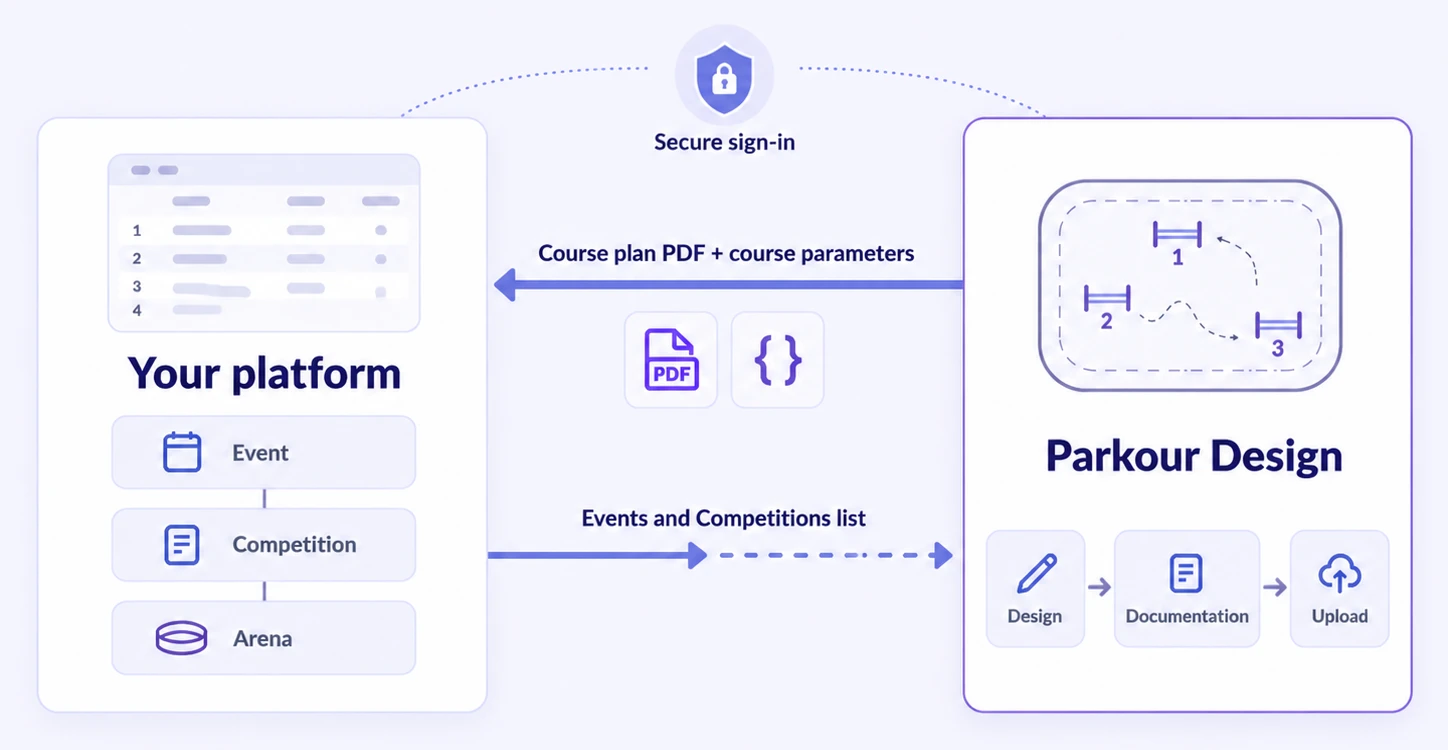
The course plan arrives in the right Event, Competition and arena, without extra emails or manual uploads by the show office.
You know who approved the plan and which version riders should see, including after a late correction.
Decides what becomes public: riders get the approved plan, while the masterplan and working versions stay private.
Riders and spectators see the approved plan next to start lists and results.
A proposed first proof of concept: the course designer sends the current plan to one Competition in your system.
The course designer prepares a design in Parkour Design.
Select the Event and Competition in the partner system.
The course designer confirms sending the current design.
The course designer sees that the plan was published, or an error that can be fixed and retried.
Uploading to a partner platform already works in the application; for your platform we connect it to your API within the scope we agree. Data can also flow the other way: your platform can start a design in Parkour Design with the Event and Competition already filled in. Design summaries from the read API are not printable course plans. Client registration, permissions and production access are reviewed with each partner.
One user problem, clear roles and a specific outcome.
Data, files, permissions, versions, responsibilities and commercial terms.
Test accounts, a sample Competition, errors, retries and republishing.
Security review, monitoring, support and an integration-disable procedure.
Users can work with their own Parkour Design subscriptions, or we agree partner access. Together we also decide who maintains the integration and who supports shared customers.
Send a short description and we will reply to arrange a call. It helps if you include:
Please do not send API keys, tokens, customer data or production files in the first message.
support@parkour.design · Read: Integration onboarding →
Show-management systems, timing and results services, federation platforms and rider portals with a show jumping workflow. We start with one specific user need and one agreed flow.
Yes. Users sign in to Parkour Design and approve access through the documented OAuth 2.0 / OpenID Connect flow. Accounts are linked by identity, not email alone. Linking accounts does not grant a subscription; access and licensing are agreed separately.
Yes. Each upload contains the PDF and the course parameters, and your platform can start by using only the PDF. We agree how your system receives the file and how a successful upload is confirmed.
Only with roles and delegated permissions agreed in both systems. The current API returns only the authenticated owner’s Events and design summaries, and a matching email address is not authorization to act for someone else.
Not in the first proof of concept. A route video beside Competition information or obstacle-level statistics are possible follow-on projects, each with its own agreement, once the plan handoff works reliably.
We start with a short product and technical call, then agree one user journey, the data contract, a test environment, responsibilities and the commercial model before implementation. Costs and dates follow from the agreed scope.
We coordinate test access, credentials and permissions after technical and security review; registration is not self-service. In the agreed test environment, both teams verify sign-in, access only to the right user’s data, the agreed data exchange and failure handling. Test and production credentials stay separate, and launch requires approval from both teams. The documentation lists the checks and acceptance scenarios.
Email support@parkour.design with the integration direction, test or production environment, the affected operation, steps to reproduce, and the expected and actual result. Include a sanitized error message or HTTP status if available. Do not send passwords, authorization codes, tokens, client secrets, personal data or customer files. Credential exchange and incident contacts are agreed separately during onboarding.