#1
Design explorer & fixes - Release 1845
New design explorer, movable labels and more fixes.
parkour

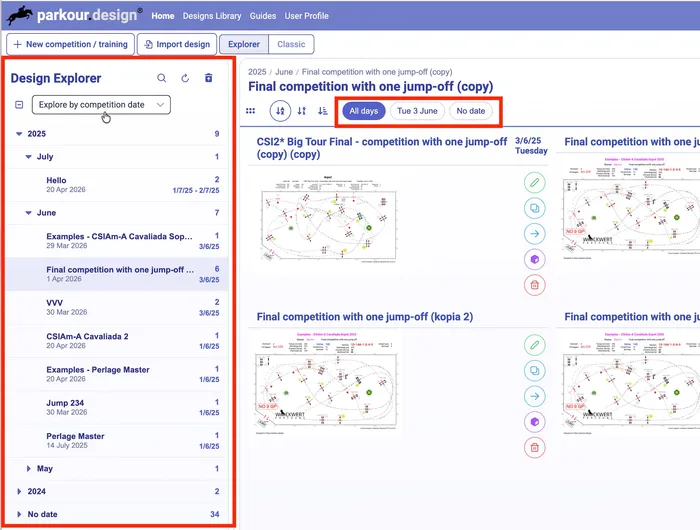
Introduced a new interface to explore your designs, aimed at better grouping and improved clarity.
The designs are presented in a form of a tree, where you can explore it by the competition date, last design update date or design creation date. The selector of a particular competition day was moved to the top of the designs panel in a form of buttons.
You can also change the horizontal size of the tree panel by dragging the line separating the panels.
Added support for the new 2026 book of rules from the Polish Equestrian Federation (PZJ).

When editing a course, it is now possible to adjust the position of obstacle numbers. Click on a label and drag it to the place of your preference.
In complex course designs with many obstacles and connected lines, dropping an obstacle directly onto the course path could be difficult. When trying to reposition a free obstacle, it could be added to the course unintentionally.
This behavior has been refined: to drop an obstacle onto the course path, hold ALT (Option on Mac). While this mode is active, a plus icon appears next to the obstacle to confirm drop-on-path mode.