Subscription plans and payments
Free trial
When you create your account in parkour.design, you get 14 days of free access to all features.

After the trial ends, you need an active subscription to keep designing.
You do not need to cancel the trial. If it expires, your saved arena layouts and course designs stay in the database and become available again after you subscribe.
Subscription Plans
parkour.design is a cloud service and is billed as a subscription.
You can choose between two plans:
- Masters: full feature set.
- Advanced: excludes:
- materials editor
- working without Internet access
- Masterplans with detailed course setup tables in PDF/printouts
Both plans share the same core toolset — see What each plan includes below, or the full side-by-side pricing table on the homepage.
Each plan is available with:
- Monthly billing
- Annual billing (includes a 15% discount)
Payments are handled by Paddle. parkour.design does not store your card details.
Listed prices do not include VAT. The final VAT amount depends on your country and is calculated during checkout.
What each plan includes
Both Advanced and Masters include the full course-design toolset.
Designing
- Course types: a single round with up to two jump-offs, and two-phases with an optional jump-off
- Unlimited number of obstacles — the number of obstacles and objects in a design is not limited by your plan or trial
- Course building automation: numbering obstacles, measuring distances and strides, real-time competition tables, and more
- Custom images and logos
- Course validation according to FEI rules
- 3D Visualisations
Infrastructure and services
- Access through a web browser (Chrome, Firefox, Edge, Safari and others) — no installation needed
- All major operating systems supported (Windows, MacOS, Linux)
- Design and all data stored in the cloud
- All designs kept private — only the author can access them
- Customer support through built-in chat and e-mail
Import / Export
- Import from PPD Software — Visio PSD files (experimental)
- Save to PDF and print: plan for athletes
Masters additionally includes, which Advanced does not:
- Materials editor
- Working without access to the Internet
- Save to PDF and print: Masterplan and tables with details how to set up the course
Change plan, billing period, or payment method
You can switch between Advanced and Masters, and between monthly and annual billing at any time.
To manage your subscription:
- Click your name in the top-right corner.
- Open Profile.
- Go to the Subscription plan tab.
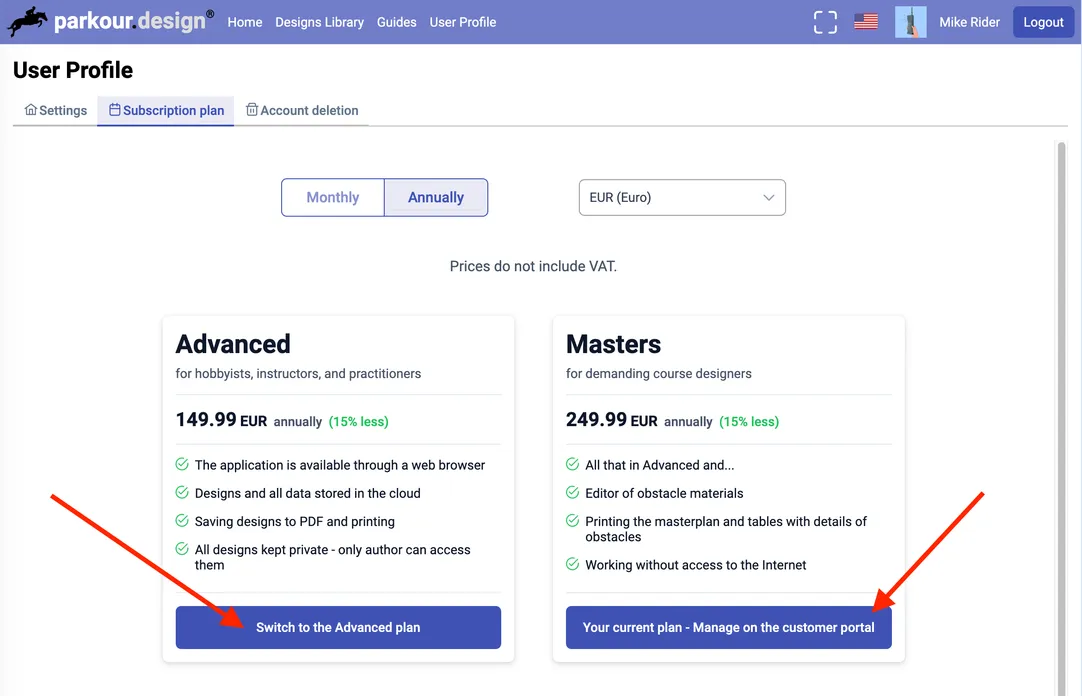
For your current plan, click Your current plan - manage on the customer portal to open Paddle Customer Portal, where you can:
- update card details
- review billing history
- cancel subscription
If you cancel, access to app features ends when your subscription ends. Your saved designs remain stored and are available again after reactivation.
For the other plan, click Switch to the Advanced/Masters plan. The change uses the billing period selected at the top of the pricing table.
Plan or billing changes take effect immediately. Charges are prorated: unused value from your previous subscription is applied before any new charge.
If the customer portal does not open, wait up to 10 seconds and check whether your browser is blocking pop-ups.