A new 3D simulation and subscription improvements - Release 1976
Major features
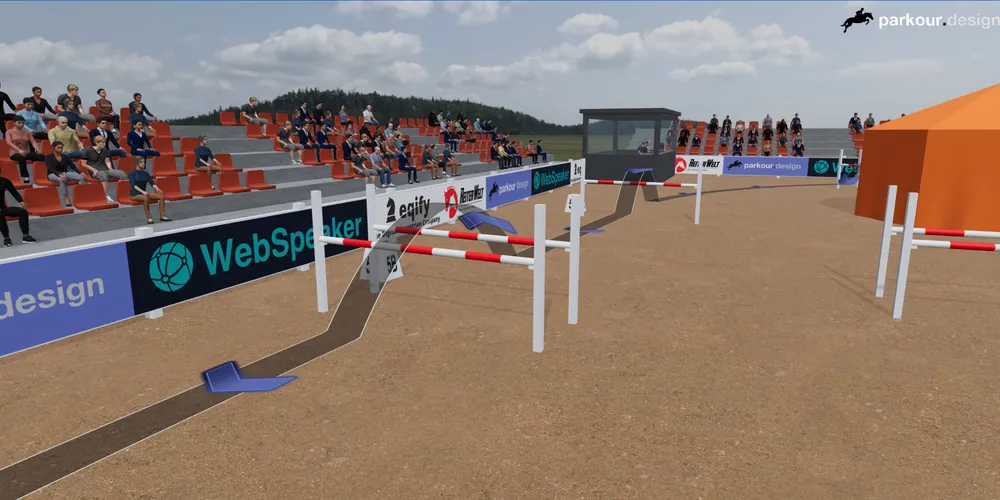
A completely new 3D simulation
The new 3D simulation brings your showjumping course to life with much better visual quality and a more realistic arena. New materials, detailed textures, improved lighting and shadows, multiple landscapes, sand and grass surfaces, spectators, audience stands, a judges’ box, a tent, cars, vegetation and configurable arena fencing create a far more convincing presentation of the course.
You can explore the arena freely from the air or at ground level, walk towards a fence to assess the approach, and follow the course using several automatic camera modes. Choose a drone view, follow the horse’s position, show the entire arena in perspective or from above, or record your own camera movement through the scene.
For the first time, Parkour can render smooth, high-quality videos directly from the 3D simulation. Each frame is rendered at the correct point in the animation, so the finished video plays smoothly at the selected 30 or 60 frames per second even when the live preview is slower. Ready-made presets cover YouTube, TikTok, Instagram and Facebook formats, while custom settings let you choose the aspect ratio, resolution up to 4K, frame rate, codec and compression quality.
The simulation offers an extensive range of configuration options. Built-in and custom profiles let you balance performance and image quality; lighting, time of day, landscapes, shadows and scene details can all be adjusted; and the course can be presented using configurable lines or strips, animated arrows or points, a jumping trajectory, obstacle numbers and dimensions. You can also place advertising banners around the arena using built-in artwork or your own uploaded images, then control their order, repetition, alignment and spacing.
We have rebuilt subscription and plan handling to make access activation, renewals, plan changes, cancellations and payment updates more reliable. The plans page now presents the current access and billing status more clearly, confirms the selected plan and billing interval before checkout, and opens the Paddle management portal more reliably, including when an existing subscription or payment issue is detected. After a trial expires, projects remain available for browsing and previewing in read-only mode, and eligible users can extend their trial by another seven days.
Fixes
Fixed an issue where closing the 3D simulation with touch controls enabled could cause an error.
Fixed an issue where insufficient graphics memory could leave the 3D simulation in a broken state instead of closing cleanly and showing useful guidance.
Fixed an error that could occur when logging out while the feedback widget was still opening.
Fixed an error that could occur when leaving or reloading a design containing grouped objects.
Fixed an issue where profile or plan information from the previous account could remain active after switching accounts in the same browser tab.
Fixed an error that could occur when selecting obstacles, objects or groups from the control-panel lists.
Fixed an issue where an object could not be rotated immediately after being pasted into the editor.
On this page
On this page
Major features
We use cookies!
This website uses essential cookies to ensure its proper operation and tracking cookies to understand how you interact with it.
The latter will be set only after consent.
Cookie preferences
Strictly necessary cookies
These cookies are essential for the proper functioning of our website.
Analytics cookies
These cookies help us analyze website traffic and usage patterns.
Marketing cookies
These cookies are used for advertising and targeting purposes.
Functionality cookies
These cookies provide enhanced functionality and personalization.